ROBO Pro Coding I²C Blöcke von fischertechnik GitLab: ft_Controller_I2C
I²C Module | I²C Hardware, Software | I²C Quellcodedateien, Blöcke
I²C Programmierbeispiele im Überblick
voice_konsole (Spracherkennung, Ausgabe in Konsole)
Learning Command Words ↓ Anleitung → wiki.dfrobot.com
Fixed Command Words ↓ Tabelle → wiki.dfrobot.com
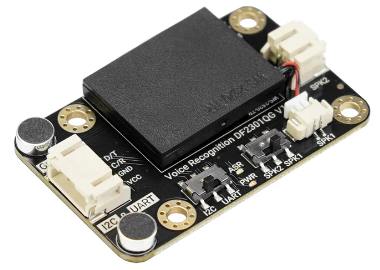
Der Spracherkennung Sensor hat zwei Mikrofone und einen Lautsprecher. Wenn er mit Strom versorgt wird (3,3V), funktioniert der Sensor selbstständig. Er hört auf das Weckwort und schaltet die blaue LED an. Solange die blaue LED leuchtet, hört er auf die anderen Kommandos. Wurde ein Kommando erkannt, ertönt aus dem Laustsprecher eine Bestätigung. 121 englische Kommandos sind fest vorgegeben und 17 Kommandos können zusätzlich erlernt werden. Das können alle Geräusche sein, selbstverständlich auch deutsche Sprache.
Die ID eines erkannten Kommandos kann über den I²C-Bus aus dem Register gelesen werden. Programmiert werden kann sonst nur der Laustprecher (an/aus/Lautstärke) und die Wachzeit (wie lange die blaue LED leuchtet). Auch Löschen ist nur über Sprache und nicht über Software möglich.
Das Lernen und Löschen der Kommandos (1 Weckwort und 17 erlernte Kommandos) erfolgt nur über englische Sprache. Dazu muss also kein Controller angeschlossen sein. Um das Lernen oder Löschen zu starten gibt es 9 feste Kommandos z.B. “Learning command word”, “Exit learning” oder “I want to delete”.
Block voice_konsole
- Quellcodedateien: i2cCode, voice
- I²C Module: I²C Spracherkennung Sensor
- Laden von fischertechnik GitLab: I2C_Voice_Recognition
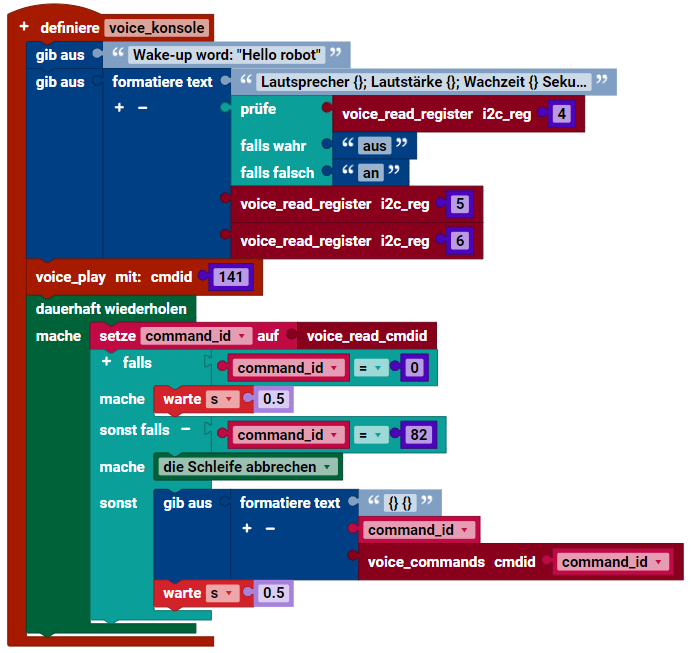
- Zeigt Lautsprecher (an/aus/Lautstärke) und die Wachzeit in der Konsole an.
- Spielt Antwort auf Kommando 141 ab: “The door is open.”
- Wartet in Endlosschleife auf Kommando ID ungleich 0.
- Wurde ein Kommando erkannt, wird der Text aus der Liste in der Konsole angezeigt.
Kommandos (Command Words)
Weckwort (Wake-up word)
Das Weckwort bezieht sich auf das Wort, das ein Produkt vom Standby-Modus in den Betriebsmodus schaltet. Es dient als erster Interaktionspunkt zwischen Benutzern und sprachgesteuerten Geräten.
- Standardweckwort (fixed wake-up word): “Hello robot”
- Nach dem Wecken leuchtet die blaue LED während der Wachzeit (waketime).
- Standard Wachzeit 15 Sekunden (kann programmiert werden).
Weckwort lernen (Learning wake-up word):
- Wecke (Initiate) den Sprachassistenten, indem du das Standardweckwort verwendest, und sage dann “Learning wake word”. Folge den Anweisungen, um das neue Weckwort zu lernen. (Vor jedem Lernkommando ist es notwendig, das zuvor gelernte Weckwort zu entfernen. Bitte beachte die Anweisungen zum Löschen von Weckwörtern und Kommandos.)
- Hinweis: Jetzt lernen, still sein, bitte das Weckwort sagen, das gelernt werden soll!
- Das vorgesehene Weckwort, das gelernt werden soll): “hello, there”.
(“hello, there” ist nur ein Beispiel) - Ansage:
Learning successful, please say it again!
(Lernen erfolgreich, bitte sage es noch einmal!) - Das vorgesehene Weckwort, das gelernt werden soll: “hello, there”.
- Ansage:
Learning successful, please say it again! - Das vorgesehene Weckwort, das gelernt werden soll: “hello, there”.
- Ansage:
Ok, learning completed!(Ok, Lernen abgeschlossen!)
Sobald der Lernprozess abgeschlossen ist, kannst du den Satz “hello, there” verwenden, um den Sprachassistenten zu wecken!
Feste Kommandos (Fixed command words):
Feste Kommandos beziehen sich auf das festgelegte Vokabular, das von Benutzern verwendet wird, um spezifische Anweisungen an sprachinteraktive Produkte zu erteilen und eine effektive Kommunikation mit ihnen zu ermöglichen.
Erlernen von Kommandos (Learning command words):
Verwende ein Weckwort (Standard oder gelernt), um den Sprachassistenten zu aktivieren, und sage dann “Learning command word”, um den Prozess des Lernens von Kommandos zu starten. Vor jeder Sitzung des Lernens von Kommandos ist es notwendig, die zuvor gelernten Kommandos zu löschen. Bitte beachte die Anweisungen zum Löschen von Weckwörtern und Kommandos.
- Hinweis: Jetzt lernen, still sein, bitte das Kommandos sagen, das gelernt werden soll!
- Zu lernendes Kommandos: “rotes Licht einschalten”
(“rotes Licht einschalten” ist nur ein Beispiel) - Ansage:
Learning successful, please say it again!
(Lernen erfolgreich, bitte noch einmal sagen!) - Zu lernendes Kommandos: “rotes Licht einschalten”
- Ansage:
Learning successful, please say it again! - Zu lernendes Kommandos: “rotes Licht einschalten”
- Ansage:
OK, learned the first command successfully! Please say the second command to be learned!
OK, erstes Kommando erfolgreich gelernt! Bitte sage das zweite Kommando, das gelernt werden soll!
… (weiter lernen)
Kommando zum Beenden des Lernmodus: “Exit learning” (“Lernen beenden”)
Nach Abschluss des Lernprozesses wird automatisch eine ID generiert. Durch die Verwendung dieser eindeutigen ID kannst du Programme erstellen, um Modelle mit Sprache zu steuern.
Weckwörter und Kommandos löschen (Delete Wake Words and Command Words):
Rufe den Sprachassistenten mit dem Weckwort (Standard oder gelernt) auf, und sage dann “I want to delete” (“Ich möchte löschen”). Befolge die Anweisungen, um die angegebenen Kommandos zu entfernen.
- Ansage:
Do you want to delete the learned wake word or command word?
(Möchtest du das gelernte Weckwort oder Kommando löschen?) - Delete command word (Kommando löschen): Löscht die gelernten Kommandos.
- Delete wake word (Weckwort löschen): Löscht die gelernten Weckwörter.
- Delete all (Alle löschen): Eliminieren Sie die assimilierten Erweckungsäußerungen und Befehlsphrasen aus dem Speicher.
- Exit deleting (Löschen beenden).
Weckwort: 1
| Wake-up words | ID | Wake-up words | ID |
|---|---|---|---|
| Wake-up words for learning | 1 | Hello robot | 2 |
Feste Kommandos: 121
| Fixed Command Words | ID | Fixed Command Words | ID |
|---|---|---|---|
| Go forward | 22 | Retreat | 23 |
| Park a car | 24 | Turn left ninety degrees | 25 |
| Turn left forty-five degrees | 26 | Turn left thirty degrees | 27 |
| Turn right ninety degrees | 28 | Turn right forty-five degrees | 29 |
| Turn right thirty degrees | 30 | Shift down a gear | 31 |
| Line tracking mode | 32 | Light tracking mode | 33 |
| Bluetooth mode | 34 | Obstacle avoidance mode | 35 |
| Face recognition | 36 | Object tracking | 37 |
| Object recognition | 38 | Line tracking | 39 |
| Color recognition | 40 | Tag recognition | 41 |
| Object sorting | 42 | Qr code recognition | 43 |
| General settings | 44 | Clear screen | 45 |
| Learn once | 46 | Forget | 47 |
| Load model | 48 | Save model | 49 |
| Take photos and save them | 50 | Save and return | 51 |
| Display number zero | 52 | Display number one | 53 |
| Display number two | 54 | Display number three | 55 |
| Display number four | 56 | Display number five | 57 |
| Display number six | 58 | Display number seven | 59 |
| Display number eight | 60 | Display number nine | 61 |
| Display smiley face | 62 | Display crying face | 63 |
| Display heart | 64 | Turn off dot matrix | 65 |
| Read current posture | 66 | Read ambient light | 67 |
| Read compass | 68 | Read temperature | 69 |
| Read acceleration | 70 | Reading sound intensity | 71 |
| Calibrate electronic gyroscope | 72 | Turn on the camera | 73 |
| Turn off the camera | 74 | Turn on the fan | 75 |
| Turn off the fan | 76 | Turn fan speed to gear one | 77 |
| Turn fan speed to gear two | 78 | Turn fan speed to gear three | 79 |
| Start oscillating | 80 | Stop oscillating | 81 |
| Reset | 82 | Set servo to ten degrees | 83 |
| Set servo to thirty degrees | 84 | Set servo to forty-five degrees | 85 |
| Set servo to sixty degrees | 86 | Set servo to ninety degrees | 87 |
| Turn on the buzzer | 88 | Turn off the buzzer | 89 |
| Turn on the speaker | 90 | Turn off the speaker | 91 |
| Play music | 92 | Stop playing | 93 |
| The last track | 94 | The next track | 95 |
| Repeat this track | 96 | Volume up | 97 |
| Volume down | 98 | Change volume to maximum | 99 |
| Change volume to minimum | 100 | Change volume to medium | 101 |
| Play poem | 102 | Turn on the light | 103 |
| Turn off the light | 104 | Brighten the light | 105 |
| Dim the light | 106 | Adjust brightness to maximum | 107 |
| Adjust brightness to minimum | 108 | Increase color temperature | 109 |
| Decrease color temperature | 110 | Adjust color temperature to maximum | 111 |
| Adjust color temperature to minimum | 112 | Daylight mode | 113 |
| Moonlight mode | 114 | Color mode | 115 |
| Set to red | 116 | Set to orange | 117 |
| Set to yellow | 118 | Set to green | 119 |
| Set to cyan | 120 | Set to blue | 121 |
| Set to purple | 122 | Set to white | 123 |
| Turn on ac | 124 | Turn off ac | 125 |
| Increase temperature | 126 | Decrease temperature | 127 |
| Cool mode | 128 | Heat mode | 129 |
| Auto mode | 130 | Dry mode | 131 |
| Fan mode | 132 | Enable blowing up & down | 133 |
| Disable blowing up & down | 134 | Enable blowing right & left | 135 |
| Disable blowing right & left | 136 | Open the window | 137 |
| Close the window | 138 | Open curtain | 139 |
| Close curtain | 140 | Open the door | 141 |
| Close the door | 142 |
Feste Kommandos zum Lernen und Löschen: 9
| Learning-related commands | ID | Learning-related commands | ID |
|---|---|---|---|
| Learning wake word | 200 | Learning command word | 201 |
| Re-learn | 202 | Exit learning | 203 |
| I want to delete | 204 | Delete wake word | 205 |
| Delete command word | 206 | Exit deleting | 207 |
| Delete all | 208 |
Erlernte Kommandos: 17
| Commands for learning | ID | Commands for learning | ID |
|---|---|---|---|
| stop | 5 | ||
| vorwärts | 6 | rückwärts | 7 |
| nach links | 8 | nach rechts | 9 |
| links vor | 10 | links zurück | 11 |
| rechts vor | 12 | rechts zurück | 13 |
| links drehen | 14 | rechts drehen | 15 |
| The twelfth custom command | 16 | The thirteenth custom command | 17 |
| The fourteenth custom command | 18 | The fifteenth custom command | 19 |
| The sixteenth custom command | 20 | The seventeenth custom command | 21 |